


Welcome to Berina Software & Accessories
Bernina Embroidery Software V7:
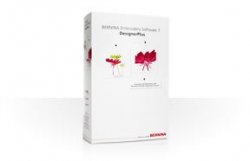
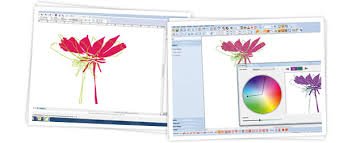
Bernina embroidery software gives your creativity wings: design, edit, and embroider motifs yourself, and discover a whole new dimension to embroidery! This software places a host of powerful design tools at your fingertips that make it absolute child's play to turn your creative ideas into reality.
Key Features:
* Stumpwork, Trapunto, & Felting
* Advanced monogramming and lettering
* AutoDigitizing and full manual digitizing funtionality
* 100's of built-in ready-to-stitch designs
* Easy-to-use interface: Icon grouping, Larger Icons, and Easy to change outline stitches and fill stitches
Most Requested Enhancements with V7:
* Easy to select colors, artistic view of pattern fills, borders, and stamps
* Shortuct to insert design or artwork
* Switch from inches to metric inside software
* Choose options for the mouse wheel
Bernina Embroidery Software V7 is available today at
The Needle and I
!
Call (425) 259-3013 to purchase your copy. Mail service available using flat rate shipping rates.
Bernina Design Works
BERNINA DesignWorks Software Suite:
Creativity in Three New Dimensions
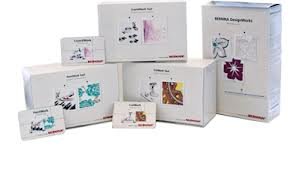
Bernina DesignWorks is a software suite consisting of three modules that can be applied independently of each other. Bernina DesignWorks supports the personalized creative construction of patterns and forms as well as the editing of completed motifs and designs on your PC. The DesignWorks family includes the modules CutWork, PaintWork, and CrystalWork.
The Bernina DesignWorks Software Suite and the companion accessory tools are compatible with the following Bernina embroidery machine models: B 580; B 750QE; B 780; B 830.
The following BERNINA embroidery machines are compatible with the CutWork accessory and software only: Artista 200/630/640/730; Aurora 430/435/440/450; Bernette 340 Deco
or higher.
CutWorks Tool:
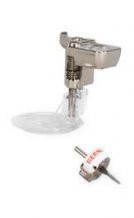
With the CutWork tool, you can cut out forms cleanly and precisely. Your imagination knows no limits. To achieve the desired results, you will need a Bernina machine capable of embroidery and the CutWork tool, which you will insert in place of the needle. Break the mold and combine your embroideries with CutWork. You will be amazed at the gorgeous effects you can achieve
– whether on garments, accessories, or quilts.
 Cut Multiple Layers:
With the CutWork
software and the CutWork tool, up to 15 layers can be cleanly cut out at once, depending on the material. You maintain precise edges quickly and evenly.
Broderie anglaise, appliqués, or patchwork:
Whether beautiful broderie anglaise or an awesome 3D look with appliqués – the combination of creative technologies produces amazing effects. And when you are working on patchwork, CutWork helps you create individual or multiple layers in the desired form with just one operation. The result: perfect quilts.
Create your own motifs using the software:
The CutWork software offers numerous tools that make the individual editing or even the creation of your own motifs on the PC possible. Operating the software is simple and clear. A sequence manager indicates the orderof the motif areas to be cut. In just a few steps, your own cut design with amazing effects can be made out of your very own idea.
PaintWorks Tool:
 With the PaintWork tool, forms, patterns, and images are painted cleanly and precisely. Your imagination knows no limits. To achieve the desired results, you will need a BERNINA machine capable of embroidery and the PaintWork tool, which you will insert in place of the presser foot. Break the mold and combine your embroideries with PaintWork. You will be amazed at the gorgeous effects you can achieve – whether on garments, accessories, or quilts.
Various pens
The PaintWork tool serves as a retainer for textile pens of all types. The tool features four varying sizes (diameters). This allows fine, medium, thick, or extra wide lines to be painted. Using the embroidery module, the desired motif is painted by your BERNINA as if by an artist.
Paint individually
The motif becomes lighter or darker according to the selected line density. The denser the line, the deeper the colors will appear on the material. You can embellish anything you'd like just the way you want. Other materials such as leather, plastic, or paper can also be painted.
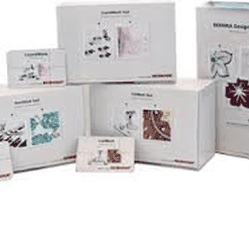 The PaintWork tool package includes
:
The PaintWork tool package includes
:
-
1 PaintWork tool
-
4 pen adapters in various sizes
-
1 set of 10 textile pens
The Bernina PaintWork tool accommodates most textile pens.
Edding 4600® textile pens are recommended for best results and available at most Bernina stores.
Create your own motifs using the software
The PaintWork software offers numerous tools that make the individual editing or even the creation of your own motifs on the PC possible. Operating the software is simple and clear. A sequence manager indicates the order of the motif lines to be painted. In just a few steps, an image with amazing effects can be made out of your very own idea.
CrystalWorks Tool:
With the CrystalWork tool, forms and patterns are precisely punched out as small holes. This hole stencil is filled with crystals that are then extracted using adhesive film in order to be ironed on to material. Your imagination knows no limits. To achieve the desired results, you will need a Bernina machine capable of embroidery and the CrystalWork tool, which you will insert in place of the presser foot. Break the mold and combine your embroideries with CrystalWork. You will be amazed at the gorgeous effects you can achieve – whether on garments, accessories, or quilts.
Sparkling patterns, all your own
Embellish anything you'd like and personalize your style. When combined with embroidery or even PaintWork or CutWork, the result is brilliant no matter what.
The CrystalWork tool package includes:
- 1 template punch stamp container
- 1 Crystal Work presser foot # 48
- 4 punch stamps in different sizes
- 4 die plates in different sizes
Varying stone sizes
The CrystalWork tool has three different punching pins that create holes with varying diameters - according to the size of the stone. This allows you to change between small, medium, or large sized stones in a single motif.
Punch stamps sized to accommodate the following:
- Crystal SS0 6: 2.0 –2.1 mm
- Crystal SS10: 2.8 –2.9 mm
- Crystal SS12 : 3.0–3.2 mm
- Crystal SS16: 3.8 – 4.0 mm
Create your own motifs using the software
The CrystalWork software offers numerous tools that make the individual editing or even the creation of your own motifs on the PC possible. Operating the software is simple and clear. A sequence manager indicates the order of the stencil holes to be punched. In just a few steps, your idea can turn into a beautifully sparkling motif.
Holds Up To 15 Spools of Thread
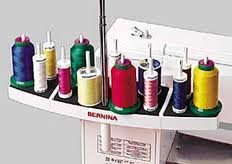
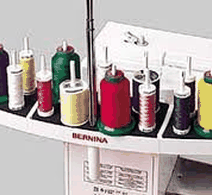
The Multiple spool holder can be mounted almost effortlessly on a wide range of sewing machines, and can also be switched between two machines with the greatest of ease. The holder has room for up to 15 spools, enabling quick access to threads of different colors. If need be, removing individual spool pins from the multiple spool holder creates room for larger spools as well as thread cones, enabling you to execute your sewing, embroidery and quilting projects more efficiently.
Quick access to a wide range of spools of different colors is a real time saver when working on multicolored embroidery designs.
Also, the multiple spool holder’s telescopic thread guide can be adjusted upwards: the thread has a longer path to the needle, allowing difficult threads like metallics to untangle and flow freely before they reach the start of the sewing process.